
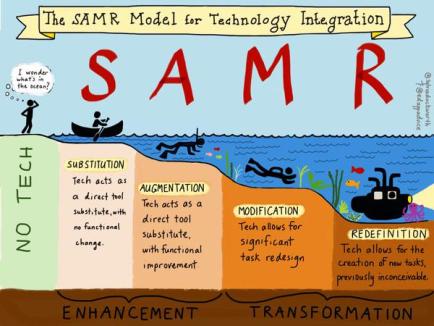
 After searching many tools that could possibly fit into my unit plan, I came across a tool called Microsoft Sway. This powerful tool promises to re-design presentations to resemble a digital “story book”. Here is an online example. I believe that this tool reaches the redefinition level of the SAMR framework. Sway allows the viewer to experience a dynamic digital presentation that feels like viewing a book rather than clicking through a static presentation. The interface is lively, fresh, and dynamic.
Sway affords the opportunity for students to experiment with content creation.  According to the Horizon Report, one of the short-term goals for K-12 schools is a push for “Student to be Creators.” Sway will assist student to become authorities of their own narrative through storytelling. The Horizon report cites that “Creative tasks empower students as they gain confidence in applying knowledge toward real scenarios.” My unit plan focuses around the topic of ‘Inferences’. Hopefully if students can recognize what type of inferences they make in their own life, then they can recognize that they can also make inferences through text. Please read the details about my experiences with Sway right here.
 Self-Reflection + Research = Better Teachers!
Hi Leilani,
You chose another tool I had never heard of so that’s awesome! I had fun browsing the resources you had in your google doc. It seems like such a fun, engaging way to present information! I did notice your con was that it would take some time to learn. I think that might be a deterrent for some, but I think there are lots of teachers or people that would enjoy using this tool to make lessons or presentations more engaging. I remember having to use PowerPoint when I was in school, but I think students now would love how engaging Microsoft Sway can be for their presentations. Overall, loved viewing the resources you provided and can’t wait to find an opportunity to give it a try!
Morisha
LikeLike
Hi there,
Fine work on the review of Sway. I have never heard of this product so I enjoyed reading through what you had to say. Nice contrasting with your pros and cons. One of my initial thoughts was how was the collaboration aspect of the product. But that was answered once I read that it can be shared with others with edit privileges. The features such as horizontal, vertical, or slideshow presentation seem to make this a notch above powerpoint or Google slides. One thing I’m left wondering however is to what level to it provide the user of interactivity? Does this product have the user actually doing anything to aid in the learning, other than clicking through the pages?
Seems like a great presentation tool, and I’m going to consider using this going forward.
Jeff
LikeLike
Leilani,
Microsoft Sway looks like it would be a great way to engage students in learning language arts content. It also seems like a great alternative to traditional presentation tools, such as PowerPoint, however, it seems like it would take some getting used to. One con that concerns me is the fact that Sway does not indicate it is saving. This concerns me because it the tool signs out but does not save, the students could risk losing all of their hard work. Another thing that concerns me is the usability of Sway. I don’t think that my elementary students would be able to create on Sway, however, they might benefit from a presentation that I create for them. Nonetheless, Sway truly looks like it will assist in engaging students in content. Thanks for the intro!
– Tiana
LikeLike
Hi Leilani.
Sway is a great tool for enriching storylines by developing creative presentations. As you said, the ability to augment the distribution of content is achievable with many of the tools we are finding; but the graphic design, and ultimately the final product is outstanding using Sway. That being said, I understand your frustration with apps that aren’t as intuitive as Google, i.e. font creation, image placement, and animation. As you know, I get frustrated even with GSlides and will opt for developing images in pptx then cut and paste into a Google presentation. Sway is, however, a much better offering than some of the really bad educational tools I have looked at.
LikeLike
Leilani, Another fine review of another tool that was new for me. I don’t recall any other student ever reviewing Sway. Actually, I cannot think of anyone over the past five years who has done anything with a Microsoft 365 tool. (Maybe something on One Note if I think more.) Google seems to have the lock on us, at least as far as UH students are concerned. Your example in Sway was brilliant. I can see students creating Sways about content and sharing them on their computers, tablets, and smartphones. I like that the author can remix until she finds a look she likes … but, as you said, content is the most important. Michael
LikeLike
Aloha Leilani,
I’ve only heard of Sway briefly before so thank you for writing a much more in depth review of the product. Sway seems like a very useful tool to use in terms of presenting and creating content. For sure, I can see how this tool may be used by middle and high school students for creating content. The link to the PowerPoint vs Sway review helped a lot to see the differences and which tool is best used for different things. It also seems like a great engaging tool for teachers as well to teach lessons to students. Like with most tools, there’s an obvious learning curve and need to get used to the tool but once you overcome that I think the tool could be fun to use in the classroom and fun for the students as well.
– Tasia
LikeLike
Hi Leilani,
Very cool! Thanks for bringing our attention to a new tool. I have not heard of Sway (Where has Microsoft been promoting this???)and the final product looks similar to an ESRI story map, so I had to go in a give it a try. One aspect that is interesting and would take me a bit of time to get used to was that the content had to be developed in the storyline, before you could view it in the design section. This made for a lot of back and forth for me, and it felt a little strange to have content without design upfront. Never-the-less, with a bit of effort, I am sure that sway presentations can indeed be very beautiful without all the odd movements of a platform like Prezi.
I know that on my end, even after I learn about new presenting tools, I fall right back to my default of using PowerPoint. I think this is because it is the platform that I have been using for years, and I (most of us?) am the most comfortable with. I love learning new tricks and have become pretty obsessed the morph transition. PowerPoint presentations can actually be fantastic if the tool is used creatively. (https://presentationpanda.com/blog/advanced-powerpoint-tips-and-tricks/).
Aloha!!!
Katie
LikeLike