
Aloha Everyone!

After scouring the internet of educational tools, I finally set my eyes on an application called Nearpod and chose this as my content presentation tool. Within these digital slides, a teacher can embedded assessments into this presentation. Nearpod can be connected with a teacher’s presentation with an access code. You can then ask students to take a quiz, draw, collaborate, take a poll, or fill in the blanks right in the middle of your presentation. Real-time data is collected and projected at the front of the classroom.
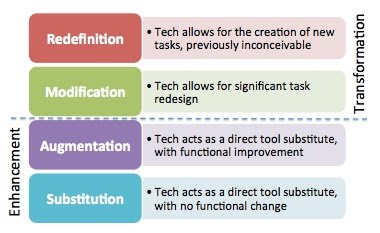
Image Source: Resources to Support the SAMR Model (Shrock, 2018)
There are several reasons why I believe that the application called Nearpod reaches the transformative level of the SAMR Framework. Normally, if students are viewing a Google Slide presentation there is no option to assess understanding in the middle of the presentation unless navigating out of the application. Hence, this application allows a teacher to view all of their student’s responses in real-time, and assess who is understanding the content and who needs help. Lastly, Nearpod provides a variety of assessment types such as polls, multiple-choice, draw and collaborate. The collaborate feature is the most interesting feature in which students can post their responses on a sticky note and “pin” it to a cork board. This can allow the teacher to spark a discussion in the classroom based on the student’s responses. Check out the full tool time #3 assignment here.
 Self-Reflection + Research = Better Teachers!
Hi Leilani,
Thanks for sharing! I’ve never heard of Nearpod before and as I was reading through your Tool Time assignment, I was very intrigued. I liked the idea of adding assessments and polls directly into the presentation. I was curious if you’ve ever used this tool in your classroom before because one of the cons you mentioned was that students names are tied to their responses. I was wondering if it is possible to give students numbers or some other generic way of naming students so that answers aren’t so obviously tied to specific students? I liked your example and how easy the presentation was to follow. I know of some other apps that offer real time feedback and data from responses from students, but they’re more quizzes rather than presentations. So this tool caught my interest because it can have information for teaching or presenting and still add in assessment questions or polls to collect some data.
Morisha
LikeLike
Leilani,
I personally have never used NearPod, but after reading your post I think it is something that I need to explore more. I say this because, as you mentioned, this tool is a way to transform assessment. Not only does this tool provide you with various assessment options, but it also the option to collect real-time data. This would greatly save time in grading, which is every teaches chore. However, one con that sticks out to me is that everyone would be able to see the results. This con sticks out because it could cause major issues in the confidentiality and privacy of students. But, a way that this could be avoided is if students utilize alias that only the teacher has knowledge of. Nonetheless, the NearPod presentation you created to teach reading comprehension is great in that it allows you to transform language arts content.
– Tiana
LikeLiked by 1 person
Hi Lani. If you found Nearpod on a list of classroom tools, please send it out. I breathed an understanding sigh when you mentioned the endless search looking for useful classroom tools. What threw me off was trying to find apps for content management and dispersal. Everything I fund only resembles what I already use. At any rate, Nearpod looks great! I love that you can build lessons using your own resources, and even some of the Nearpod lesson plans look to be formatted well with quality content. I looked at the pricing chart. Free basic gives you 50mb to play with. I believe that’s cutting it close. You would have to store each lesson on an external drive and wipe it from Nearpod to make room for another lesson. Whatever: $120 a year for 3gb? I like it. By the way, nice webpage you have.
LikeLike
Hi Lani,
This immediately made me think of the iclickers that some of the bigger classes at UH use to assess students understanding as you go.
https://www.iclicker.com/
What I find neat about nearpod is it essentially gets rid of the added cost of the iclicker for the same type of engagement and assessment during a class. Do students need to pay for a nearpod subscription to access your lecture?
Cheers!
Katie
LikeLiked by 1 person
Wowww… I loved going through the different resources that you have provided. This is interesting for a BYOD type setting or even if your class has access to such devices for students. I wonder if NearPod works for students who may be able to bring their own laptop. So cool. Thanks for sharing.
LikeLike
Hi Leilani,
Loved your rundown of Nearpod. This is my first time hearing about it! But it seems like an awesome tool for checking on your class in real-time. It seems like a much more interactive PowerPoint. Your pros and cons table is very thorough. One thing that catches my attention is the lack of anonymity since it displays the students name along with their response. As you mentioned, it does pose as an issue for students that are less inclined to share their thoughts and feedback if their name is tailored to their response. I wonder if there’s a way to make it so that students are more comfortable giving their responses.Based on your example, I’m very intrigued with your unit design on what seems to deal with literary analysis. Can’t wait to learn more about your unit design.
LikeLiked by 1 person
Aloha Leilani,
I like the way Nearpod intermingles content distribution and formative assessment. Your example was very good but I would have liked to have seen it in it’s interactive state, on Nearpod. Is that possible or is that only done during synchronous sessions. (If the latter is true, maybe you can present it to us at a live session.)
You review was nicely done. The evaluation instrument you chose, Hatch Evaluation, is new to me but seems easy to use and effective.
Michael
LikeLiked by 1 person