
Spiral is an interactive platform that allows students to collaborate, gain teacher feedback, and discuss their ideas in real-time. There are 4 types of activities that I have explained below. Each activity performs a different function that fosters social learning.
- Quickfire: Teacher can ask a question or quiz a student. Teacher can give real-time feedback to each student and ask them yo revise their answer.
- Discuss: When a presentation is\being shown in the classroom, students can ask questions, share pictures, or comment to one another.
- Clip: A teacher or student can upload a video and the video can be marked at specific places to stop and check for understanding.
- Team Up: A teacher can assign teams and have students collaborate on a presentation.
I wanted to find a social learning tool that is more robust than the ones I am already used to. Tools that I am familiar with is Socrative, Nearpod, WeVideo, and Google Slides. BUT, if all those apps made a baby it would be definitely be combined into the Spiral app.
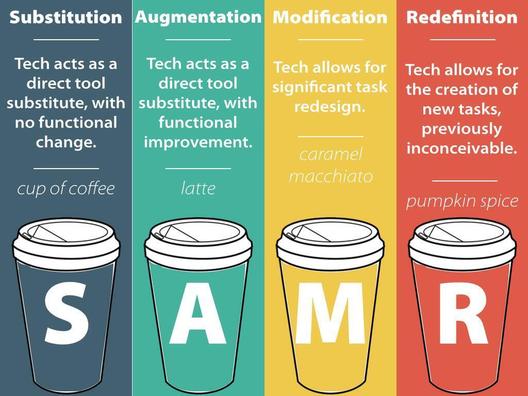 Based on the SAMR Framework, I believe that Spiral reaches the transformative level of technology integration. One features such as “Clip” provides a new way to watch video in education.
(PICTURE SOURCE: http://www.schrockguide.net/samr.html)
Instead of watching a video, it can be interactive, where the teacher can predetermine pauses in the video to quiz or poll students. This type of check for understanding is fascinating, and is lacking in many YouTube videos. We can learn from videos, but for my middle school students their needs to be some break in their attention before they forget what they learned!
Another fascinating aspect of Spiral is that in Quickfire mode, students can answer through different representations such as record an audio response or use a whiteboard to mark up the question. Really liking this tool so far! View the full text of my review here.
 Self-Reflection + Research = Better Teachers!
Hi Leilani! Spiral seems like such an interactive way to engage students in collaboration within the classroom. I’ve never heard of this tool and love being exposed to new tools. I’m not sure if I could use this in my kindergarten classroom as features require technology skills that I’m not sure my little ones have, but still a great tool to know about! I liked the quickfire feature because it’s beneficial to ask a question or quiz a student quickly to get a temperature check of how the student is doing. I also really liked that it gave students real-time responses so they know if they got their answer correct or understand why it was wrong. Being able to assign students to teams with the team up feature seems like a great start to collaboration. Really interesting tool!
-Morisha
LikeLike
Hi Leilani,
WOW! Spiral looks like a great tool to encourage collaboration among learners. The many features that it has allowed for a transformative and redesigned way of not only collaboration but assessment as well. The feature that I found the most intuitive was “Clip”. I think that “Clip” would be very effective as a formative assessment tool as well as assist in informing instruction. Not only would it be a good formative assessment, but it would also allow for differentiation in that students can visually watch the content rather than just learn through lecture or a book. Lastly, the screencast you created that walk us through your example was great! it truly allowed me to see how Spiral can be utilized to teach content.
– Tiana
LikeLike
Hi Leilani,
As the others said, I am most interested in the Clip feature. That is pretty cool. I currently have my students watch a pre-class youtube video and answer five questions before each class meeting to prep them for the topic of the day. The five questions are in a separate word doc, and I like the idea of being able to pause a video and have the questions pop up. I might give this a try. I also appreciate the video walk through that you created. Excellent example of social learning.
-Katie
LikeLike
Aloha Leilani,
Wow! This is my first time being introduced to this tool! It seems like a fascinating tool to use for student-teacher collaboration. Being able to incorporate mid-video questions/polls is very useful and a great way to check student understanding/comprehension of content. Like Tiana mentioned, it also seems really great for formative assessments in a track-as-you-go sort of way. Great review!
-Tasia
LikeLike
Thank you so much Leilani for sharing another awesome tool. I actually really liked your sharing of Tool Time #4 as well. Glad that you were able to find a tool that you are excited to use and I look forward to diving into the tool to also help me with my lessons. Excellent sharing. Mahalo
LikeLike
Hi Lani. Spiral would be great for whole-class assignments (one of the attributes I was looking for with VoiceThread). Even when groups present their slides the whole class gets to participate, not just clapping at the end. Shy students are also afforded some anonymity in their critique. The Quickfire sessions would be great for exit tickets, but above all, I’m impressed with the instructor control over the assignments and the ability to see exactly how much each student has participated. Thank you, Bryan
LikeLike
Aloha Lailini,
This multi-tool platform seems to contain some collaborative parts and some that are more assessment (you said “quick check”). It’s nice that they are all contained in one place and might make the use of Spiral more “cost effective” to the teacher, especially if they use Google Classroom. Some of your classmates like the Clip tool; I’ve seen that kind of tool in other places but the integration here with the 3 other tools you showed make the package attractive.
You said< I believe that Spiral reaches the transformative level of technology integration." It's not the tool itself that is transformative, it's how the tool is used. You would be better saing, "Spiral could reach …"
LikeLike